# EmojiOne Area Version 2.1 (Legacy)
EmojiOne Area is a small jQuery plugin that allows you to transform any html element into simple WYSIWYG editor with
ability to use Emojione icons.
The end result is a secure text/plain in which the image icons will be replaced with their Unicode analogues.
EmojiOneArea 2.1 is legacy, and unsupported.
For new projects you should use the latest 3.x version...
[See here for EmojiOneArea 3.x Docs](https://github.com/mervick/emojionearea)
### Version 2.1
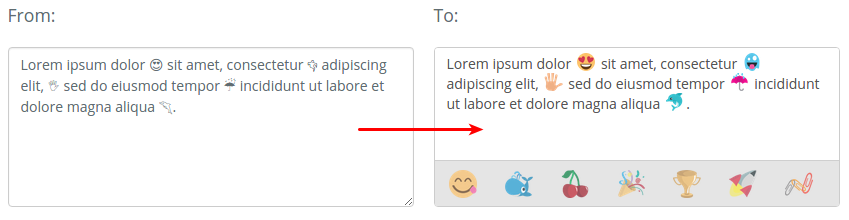
#### Version 2.1 Standalone mode
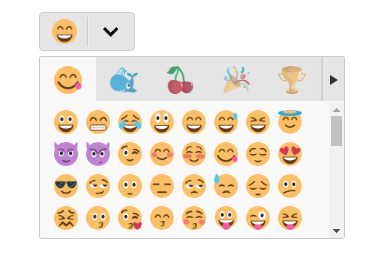
[See the Live Demo here.](http://mervick.github.io/emojionearea/)
## Installation
The preferred way to install is via [Bower](http://bower.io/), [npm](https://www.npmjs.com/) or [Composer](https://getcomposer.org/).
### Install v2.1
```bash
bower install emojionearea#^2.1.0
# or
npm install emojionearea@^2.1.0
# or
composer require mervick/emojionearea ^2.1.0
```
## Usage
Add the following lines to `head`:
```html
```
Simple usage:
```html
```
### Options v2.1
Customize emojione version
```js
// version by default is 1.5.2
window.emojioneVersion = "2.1.1";
```
Default options
```js
var default_options = {
template : "", // plugin template
dir : "ltr", // direction http://www.w3schools.com/tags/att_global_dir.asp
spellcheck : false, // spellcheck http://www.w3schools.com/tags/att_global_spellcheck.asp
autocomplete : "off", // autocomplete http://www.w3schools.com/tags/att_input_autocomplete.asp
autocorrect : "off", // autocorrect https://davidwalsh.name/disable-autocorrect
autocapitalize : "off", // autocapitalize http://www.w3schools.com/tags/att_input_autocomplete.asp
buttonTitle : "Use the TAB key to insert emoji faster", // title of emojionearea smiley button
placeholder : null, // placeholder
pickerPosition: : "top", // position of picker in relation to input [ top | bottom | right ]
container : null, // by default, emojionearea container created directly under source,
// in this option you can specify custom {jQuery|selector} container
tones : true, // whether to show the skin tone buttons in Emoji picker
tonesStyle : "bullet" // style of skin tones selector [ bullet | radio | square | checkbox ]
hideSource : true, // hide source element after binding
autoHideFilters : false, // auto hide filters panel
sprite : true, // use sprite instead of images, is awesome, but not works in old browsers
shortnames : false, // if true - will converts emojis to short names,
// by default converts emojis to unicode characters
standalone : false, // whether to use standalone EmojiOneArea picker (for EmojiOneArea 2.1 only)
useInternalCDN : true,
recentEmojis : true, // whether to show recently select Emoji's in picker
textcomplete: {
maxCount: 15, // max amount of items to show in autocomplete drop-down list
placement: null, // placement of autocomplete dropdown list [ null (default) | top | absleft | absright ]
},
filters: {
// customize filters & emoji buttons
// see in source file href="https://raw.githubusercontent.com/mervick/emojionearea/master/src/var/default_options.js
},
events: {
// events handlers
// see below
}
};
```
### Api v2.1
```js
.on(events, handler);
// - events
// Type: String
// One or more space-separated event types and optional namespaces
// - handler
// Type: Function(jQuery Element, Event eventObject [, Anything extraParameter ] [, ... ] )
// A function to execute when the event is triggered.
.off(events[, handler]);
// - events
// Type: String
// One or more space-separated event types and optional namespaces
// - handler
// Type: Function(jQuery Element, Event eventObject [, Anything extraParameter ] [, ... ] )
// A handler function previously attached for the event(s)
// built-in events:
// "mousedown", "mouseup", "click", "keyup", "keydown", "keypress"
// "filter.click", "emojibtn.click", "arrowLeft.click", "arrowRight.click",
// "focus", "blur", "paste", "resize", "change"
.setText(str);
// - str
// Type: String
// Set text
.getText();
// Get text
// Usage methods, example:
var el = $("selector").emojioneArea();
el[0].emojioneArea.on("emojibtn.click", function(btn, event) {
console.log(btn.html());
});
```
### Events v2.1
Two ways to set events, in options:
```JS
$("selector").emojioneArea({
events: {
/**
* @param {jQuery} editor EmojioneArea input
* @param {Event} event jQuery Event object
*/
focus: function (editor, event) {
console.log('event:focus');
},
/**
* @param {jQuery} editor EmojioneArea input
* @param {Event} event jQuery Event object
*/
blur: function (editor, event) {
console.log('event:blur');
},
/**
* @param {jQuery} editor EmojioneArea input
* @param {Event} event jQuery Event object
*/
mousedown: function (editor, event) {
console.log('event:mousedown');
},
/**
* @param {jQuery} editor EmojioneArea input
* @param {Event} event jQuery Event object
*/
mouseup: function (editor, event) {
console.log('event:mouseup');
},
/**
* @param {jQuery} editor EmojioneArea input
* @param {Event} event jQuery Event object
*/
click: function (editor, event) {
console.log('event:click');
},
/**
* @param {jQuery} editor EmojioneArea input
* @param {Event} event jQuery Event object
*/
keyup: function (editor, event) {
console.log('event:keyup');
},
/**
* @param {jQuery} editor EmojioneArea input
* @param {Event} event jQuery Event object
*/
keydown: function (editor, event) {
console.log('event:keydown');
},
/**
* @param {jQuery} editor EmojioneArea input
* @param {Event} event jQuery Event object
*/
keypress: function (editor, event) {
console.log('event:keypress');
},
/**
* @param {jQuery} editor EmojioneArea input
* @param {Event} event jQuery Event object
*/
paste: function (editor, event) {
console.log('event:paste');
},
/**
* @param {jQuery} editor EmojioneArea input
* @param {Event} event jQuery Event object
*/
change: function (editor, event) {
console.log('event:change');
},
/**
* @param {jQuery} filter EmojioneArea filter
* @param {Event} event jQuery Event object
*/
filter_click: function (filter, event) {
console.log('event:filter.click, filter=' + filter.data("filter"));
},
/**
* @param {jQuery} button EmojioneArea emoji button
* @param {Event} event jQuery Event object
*/
emojibtn_click: function (button, event) {
console.log('event:emojibtn.click, emoji=' + button.children().data("name"));
},
/**
* @param {jQuery} button EmojioneArea left arrow button
* @param {Event} event jQuery Event object
*/
arrowLeft_click: function (button, event) {
console.log('event:arrowLeft.click');
},
/**
* @param {jQuery} button EmojioneArea right arrow button
* @param {Event} event jQuery Event object
*/
arrowRight_click: function (button, event) {
console.log('event:arrowRight.click');
}
}
});
```
or by `.on()` & `.off()` methods:
```JS
var el = $("selector").emojioneArea();
// attach event handler
el[0].emojioneArea.on("emojibtn.click", function(button, event) {
console.log('event:emojibtn.click, emoji=' + button.children().data("name"));
});
// unset all handlers attached to event
el[0].emojioneArea.off("emojibtn.click");
// like in jQuery you can specify few events separated by space
el[0].emojioneArea.off("focus blur");
// set & unset custom handler
var eventHandler1 = function(button, event) {
console.log('event1');
};
var eventHandler2 = function(button, event) {
console.log('event2');
};
// attach event handlers
el[0].emojioneArea.on("click", eventHandler1);
el[0].emojioneArea.on("click", eventHandler2);
// unset eventHandler1
el[0].emojioneArea.off("click", eventHandler1);
```
## Requirements
- [jQuery](https://jquery.com/) >= 1.8.2
## License
EmojiOneArea is released under the MIT license.